
Download ScreenVirtuoso – Free Screen Recording & Video Conversion Tool for Windows
ScreenVirtuoso is a powerful yet lightweight video recording and conversion tool designed for Windows users who need a reliable solution for capturing screen activity and converting video files. With a clean interface and efficient performance, this software stands out as a go-to choice for educators, content creators, and professionals who frequently record tutorials, presentations, or gameplay. Though originally released in 2006, ScreenVirtuoso continues to deliver solid functionality, especially for users running older Windows systems like Windows 98 or Windows ME.
The latest version, 2.10, was updated in April 2006, and while the software hasn’t seen recent updates, its core features remain effective for basic screen capture tasks. Available in English and free to download, ScreenVirtuoso is ideal for users seeking a no-frills, secure, and lightweight alternative to modern screen recording tools. It has gained popularity in regions like Pakistan and Germany, where users appreciate its low system requirements and straightforward operation.
Whether you're recording a quick tutorial or converting legacy video formats, ScreenVirtuoso offers a stable and efficient experience.
Key Features of ScreenVirtuoso
ScreenVirtuoso is packed with essential features that make it a valuable tool for screen recording and video conversion, even in today’s competitive software landscape. One of its standout capabilities is real-time screen recording with high-quality output, allowing users to capture everything from desktop activity to online lectures and software demos. The software supports multiple video formats, including AVI, WMV, and MPEG, making it easy to convert files across platforms without needing additional tools. Its lightweight design ensures minimal impact on system performance, which is especially beneficial for older PCs with limited RAM or processing power. Another notable feature is the built-in video editor, which enables users to trim clips, add basic effects, and adjust audio levels directly within the app—ideal for quick edits without switching to more complex software.
For users who prioritize privacy and security, ScreenVirtuoso offers a clean, ad-free interface with no bundled malware or tracking scripts. This makes it a trustworthy option for recording sensitive content such as business meetings or personal tutorials. The software also includes customizable recording settings, allowing you to select specific screen regions, set frame rates, and adjust audio input sources.
Whether you're capturing a full-screen presentation or a small window, ScreenVirtuoso gives you precise control. Additionally, the program supports recording from external video sources like webcams or TV tuners, expanding its utility beyond just screen capture. Despite its age, the software remains functional and intuitive, with a simple workflow that doesn’t require extensive training.
These features collectively make ScreenVirtuoso a dependable choice for users who value simplicity, reliability, and performance on legacy systems.
Installation & Usage Guide for ScreenVirtuoso
Installing ScreenVirtuoso is a straightforward process, especially for users familiar with older Windows environments. Begin by downloading the installer file from a trusted source. Since the software is compatible with Windows 98 and earlier versions, ensure your system meets the minimum requirements before proceeding.
Once downloaded, double-click the setup file to launch the installation wizard. The process is quick and requires minimal user input—just follow the on-screen prompts, accept the license agreement, and choose your preferred installation directory. The entire process typically takes less than two minutes, and the software will be ready to use immediately after installation.
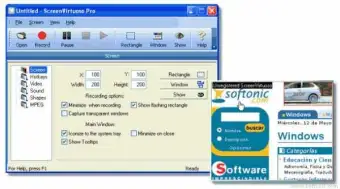
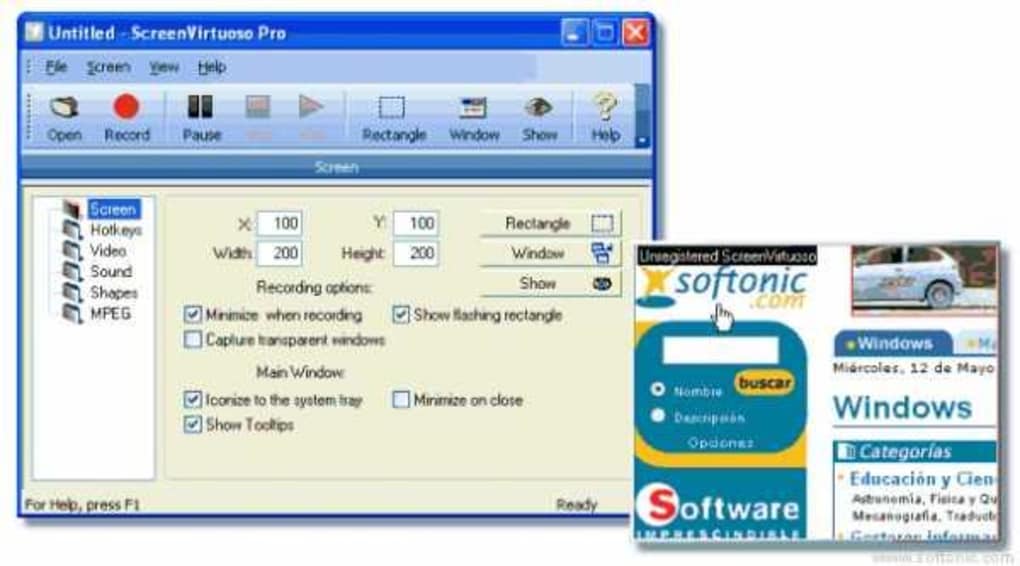
Upon launching ScreenVirtuoso, you’ll be greeted with a minimalistic interface that makes navigation intuitive. To start recording, click the “Record” button and select your recording mode—full screen, window, or custom region. You can also configure audio settings, such as choosing between microphone input or system audio, and adjust the frame rate and video quality.
Once everything is set, click “Start” to begin capturing. The recording runs in the background, and a small overlay displays the current time and recording status. When finished, click “Stop” to save the file.
The software automatically prompts you to choose a save location and file format, offering options like AVI, WMV, or MPEG. For video conversion, simply open the “Convert” tab, select your source file, and choose the desired output format. The conversion process is fast and maintains good video quality, even on older hardware.
One of the advantages of ScreenVirtuoso is its low resource consumption. It runs efficiently on systems with as little as 128MB of RAM, making it perfect for older machines. Users can also schedule recordings in advance, though this feature is limited compared to modern tools. Overall, the usage experience is smooth and hassle-free, especially for those who prefer a no-nonsense approach to screen capture and conversion.
Compatibility & System Requirements
ScreenVirtuoso is specifically designed for older Windows operating systems, making it a niche but valuable tool for users still relying on legacy hardware. It officially supports Windows 98, Windows ME, and earlier versions, which means it won’t run on modern systems like Windows 10, 11, or macOS. This limitation is important to note before downloading, especially for users upgrading their devices. However, for those using older PCs or maintaining compatibility with vintage software environments, ScreenVirtuoso remains a solid choice.
The software has minimal system requirements, which contributes to its lightweight nature. It requires only 128MB of RAM and approximately 10MB of free disk space—significantly less than most modern screen recording apps. This makes it ideal for low-end machines that struggle with resource-heavy software. Additionally, ScreenVirtuoso does not require a dedicated graphics card, relying instead on basic video processing capabilities available in older systems. It also works well with standard sound cards, allowing for clear audio capture during recordings.
While it lacks support for newer platforms, ScreenVirtuoso’s compatibility with older Windows versions ensures stability and reliability. Users in regions like Pakistan and Germany—where many institutions still use legacy systems—have found it particularly useful for training, documentation, and educational content. For those seeking a secure, free, and efficient tool for screen capture and video conversion on outdated hardware, ScreenVirtuoso is an excellent fit. However, if you're using a modern OS, you may want to consider alternatives like oCam or FastStone Capture, which offer similar functionality with updated support.
Pros & Cons of ScreenVirtuoso
- Pros:
- Lightweight and fast, ideal for older systems with low RAM
- Free to download and use with no ads or malware
- Supports multiple video formats (AVI, WMV, MPEG)
- Simple, intuitive interface suitable for beginners
- Real-time screen recording with customizable settings
- Includes basic video editing and conversion tools
- Stable performance with minimal crashes or errors
- Cons:
- Only compatible with Windows 98 and earlier versions
- No updates since 2006; lacks modern features like cloud sync or HD recording
- No support for macOS, Android, or iOS
- Basic video editing capabilities—limited compared to modern tools
- No scheduled recording or advanced automation features
FAQ – Frequently Asked Questions
Final Verdict & Call to Action
ScreenVirtuoso may not be the most modern screen recording tool on the market, but it remains a reliable and efficient solution for users working with older Windows systems. Its lightweight design, free licensing, and straightforward functionality make it a standout choice for educators, trainers, and professionals who need a no-frills tool for capturing and converting video content. While it lacks support for modern operating systems and advanced features like HD recording or cloud integration, its core capabilities are solid and stable.
If you’re still using Windows 98 or ME, or maintaining legacy systems in an educational or business environment, ScreenVirtuoso is definitely worth downloading. It’s a secure, free, and proven tool that delivers consistent performance. For users on newer systems, consider alternatives like oCam or FastStone Capture, which offer similar benefits with updated compatibility.
Download ScreenVirtuoso today and experience a simple, secure, and efficient way to record your screen and convert videos—perfect for older PCs and basic recording needs.







